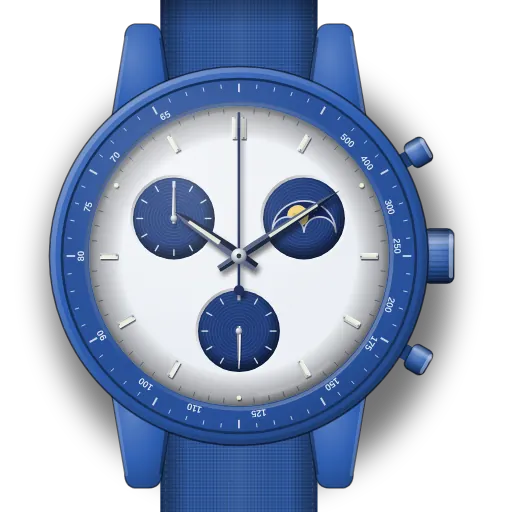
How to set up the MoonSwatch Mission to the Super Blue Moonphase
Short answer: Use crown position III and the lower pusher B to move the moon. Hold B for big jumps, tap it for one-hour steps. Re-zero the chronograph at position II: A chooses the hand, B moves it. The blue bezel is a pulsometer, read after timing 30 heartbeats.
Mission to the Super Blue Moonphase at a glance
| Reference | SO33N700 |
|---|---|
| Sale period | Only 1 to 19 August 2024, in selected Swatch stores. The last day was that year's super blue moon. |
| Bezel | Blue pulsometer with white markers, in place of a tachymeter |
| Crown | I / II / III. Moon at III, chrono re-alignment at II, time at III. |
| Moon disc | At 2 o'clock. It moves forward only. |
What do you need to set on the Mission to the Super Blue Moonphase?
Set up moon phase on the MoonSwatch Mission to the Super Blue Moonphase
- 1
Pull the crown to III
Two clicks out. Here the lower pusher (B) drives the moon disc.
- 2
Hold B to move in big jumps
A long press keeps the disc moving, in steps of about five days, and speeds up the longer you hold.
- 3
Tap B to finish
Each short press (under a second) moves the disc forward one hour. Stop when the moon matches tonight.
- 4
Push the crown back to I
The disc now moves on its own. The hands stood still while the crown was at III, so check the time.
Reset chronograph hands on the MoonSwatch Mission to the Super Blue Moonphase
- 1
Stop and reset first
Crown at I. Stop the chronograph with A and reset with B, so you can see which hand is off.
- 2
Pull the crown to II
One click out.
- 3
Press A once: seconds hand selected
The central chrono seconds hand makes one full turn to show it is selected.
- 4
B moves it to 12
Short press = one step, long press = fast. Stop exactly on 12.
- 5
Press A again: minute counter
Now B moves the 60-minute counter at 10 o'clock. Bring it to zero.
- 6
Crown back to I and test
Start, stop and reset. Both hands should land on zero.
🎯 All chrono hands at zero ✓
Set the time on the MoonSwatch Mission to the Super Blue Moonphase
- 1
Pull the crown to III
Two clicks out. The small seconds hand stops.
- 2
Turn to set the time
Turn either way until the hands match your clock.
- 3
Push the crown back to I
Push it in on the beat of your reference clock.
What owners run into
- Bought second-hand without the leaflet? Swatch's Mission to the Moonphase manual (linked below) covers the same crown and pusher functions.
- The blue pulsometer is easy to misread as a tachymeter. Its numbers are heartbeats per minute after 30 beats, not speed.
- If the moon looks a day out after a battery change, set it again at III with short presses of B. Each press is one hour.
How the Mission to the Super Blue Moonphase differs from similar watches
It shares the movement and buttons of the Mission to the Moonphase, and the pulsometer idea of the Pink Moonphase. On the Super Blue the bezel is blue. The other difference is how few were sold.
Quick answers
When was the Super Blue Moonphase sold?
From 1 to 19 August 2024 only, at selected Swatch stores.
Does the Super Blue Moonphase have a tachymeter?
No. Its bezel is a pulsometer for reading heart rate over 30 beats.
Which manual covers the Super Blue Moonphase?
Swatch's Mission to the Moonphase manual describes the same crown and pusher functions. It is linked under Sources.